
Azure Offer IDs: What They Are, Why They’re Confusing, and Why Your Automation Keeps Lying to You
- Shannon

- Jan 16
- 5 min read
Like all my previous blogs, code to accompany this post exists here.
If you have ever tried to answer the question “what kind of Azure subscription is this?” using automation, you probably assumed there was a clean, authoritative answer somewhere. An API call. A property. A single source of truth. And if you have spent any real time with Azure billing or FinOps work, you already know how quickly that assumption falls apart.
Most people eventually land on Offer ID. The Azure portal shows it. Microsoft documents it. It ultimately feels like the right thing to key off of. So you start building scripts to enumerate subscriptions, pull offer IDs, and classify what you have. At first, it even looks like it works. Then you hit a subscription where the Offer ID is missing. Or worse, it exists in the portal but nowhere else. Or it shows up sometimes, depending on which API you call and how recently the subscription has had usage.
This post exists because that confusion is not accidental, and it is not your fault.
Where Offer IDs Came From in the First Place
Offer IDs come from Azure’s original commerce model, called the Microsoft Online Services Program, or MOSP. In the early days of Azure, every subscription was created under a specific offer, and that offer controlled pricing, entitlements, and behavior. Think classic Pay As You Go, Visual Studio Enterprise, MSDN Dev Test, and early partner offers. In that world, an Offer ID actually meant something concrete and universal.
Microsoft still documents these offers publicly, and that documentation is accurate. The offers are real, and many of them are still in use today. The problem is not that Offer IDs stopped existing. The problem is that Azure’s billing and commerce model evolved, but Offer IDs never became a clean first-class citizen in the new world.
The Modern Azure Commerce Reality
Today, Azure subscriptions live under multiple commercial constructs. You might be dealing with Microsoft Customer Agreement subscriptions, Enterprise Agreements, CSP, sponsorships, partner benefits, Visual Studio subscriptions, or MVP benefits. Each of these is backed by different billing logic, different renewal behavior, and sometimes different backend systems entirely.
To support this, Microsoft introduced the Microsoft.Billing resource provider, along with billing accounts, billing profiles, and invoice sections. This was a necessary evolution, but it also meant that Offer ID stopped being the primary way Azure identifies a subscription commercially. In many cases, the offer is implied by the agreement, not explicitly exposed.
This is where things start to feel inconsistent. Some subscriptions still surface Offer IDs cleanly. Others do not. Some only surface them in very specific contexts. And some show them only in the portal.
Why the Azure Portal Knows More Than You Do
One of the most frustrating parts of working through this is realizing that the Azure portal often appears to “know” things that no public API will return. You can click into a subscription and clearly see an offer name or benefit type, especially for Visual Studio, MVP, or sponsorship subscriptions. Then you try to retrieve that same information programmatically and come up empty-handed.
This is not because you are missing an API version or calling the wrong endpoint. It is because the portal is pulling from internal commerce metadata that is not fully exposed through ARM, Microsoft.Billing, or Microsoft.Consumption. The portal smooths over decades of billing evolution. Public APIs do not.
Once you internalize that distinction, a lot of the weird behavior suddenly makes sense.
The Trap: Expecting One API to Solve This
A very common mistake, and one I absolutely made myself while testing this, is assuming that if you just find the right API, everything will line up. In reality, different APIs expose different slices of the truth.
Microsoft.Billing works well for subscriptions that are truly billing-backed in the modern sense, like PAYG under MCA, some legacy PAYG subscriptions, and some partner subscriptions. It does not work reliably for Visual Studio or MVP subscriptions.
Microsoft.Consumption sometimes exposes Offer IDs through usage records, particularly for legacy MOSP subscriptions and Visual Studio subscriptions that have recent usage. But that is conditional. No usage means no Offer ID. And some programs never attach an Offer ID to usage at all.
This is why scripts often appear to “half work.” They are not wrong. They are incomplete.
The Script That Finally Reflected Reality
After trying to force a single clean answer and failing repeatedly, the most honest solution was to accept the platform as it is and build automation that reflects that reality instead of fighting it.
The approach that actually works is:
Enumerate subscriptions via ARM
Attempt to retrieve Offer ID via Microsoft.Billing
If that fails, fall back to Microsoft.Consumption usage data
Explicitly label subscriptions where the Offer ID is not exposed by any public API
Here is the script that finally did that without pretending there was a universal answer.
Connect-AzAccount | Out-Null

$arm = "https://management.azure.com"
$token = (Get-AzAccessToken -ResourceUrl $arm).Token
$headers = @{
  Authorization = "Bearer $token"
  "Content-Type" = "application/json"
}

function Invoke-ArmGet {
  param([string]$Uri)
  Invoke-RestMethod -Method GET -Uri $Uri -Headers $headers
}

function Get-FirstConsumptionOfferId {
  param([string]$SubscriptionId)

  $end = (Get-Date).ToString("yyyy-MM-dd")
  $start = (Get-Date).AddDays(-90).ToString("yyyy-MM-dd")
  $api = "2019-11-01"

  $filter = [System.Web.HttpUtility]::UrlEncode(
    "properties/usageStart ge '$start' and properties/usageEnd le '$end'"
  )

  $uri = "$arm/subscriptions/$SubscriptionId/providers/Microsoft.Consumption/usageDetails" +
         "?api-version=$api&`$filter=$filter&`$top=1"

  try {
    $resp = Invoke-ArmGet -Uri $uri
    if ($resp.value -and $resp.value.Count -gt 0) {
      return $resp.value[0].properties.offerId
    }
  } catch {}

  return $null
}

$results = foreach ($sub in Get-AzSubscription) {

  $offerId = $null
  $source = "NotExposedByPublicAPI"

  try {
    $billingUri = "$arm/providers/Microsoft.Billing/billingSubscriptions/$($sub.Id)?api-version=2024-04-01"
    $billing = Invoke-ArmGet -Uri $billingUri
    if ($billing.properties.offerId) {
      $offerId = $billing.properties.offerId
      $source = "Microsoft.Billing"
    }
  } catch {}

  if (-not $offerId) {
    $offerId = Get-FirstConsumptionOfferId -SubscriptionId $sub.Id
    if ($offerId) {
      $source = "Microsoft.Consumption"
    }
  }

  [pscustomobject]@{
    SubscriptionName = $sub.Name
    SubscriptionId   = $sub.Id
    OfferId          = $offerId
    OfferSource      = $source
  }
}

$results | Format-Table -AutoSize
This script does not promise perfection, but what it promises is honesty. When the Offer ID exists and is publicly exposed, you get it returned. When it does not, the script tells you that instead of silently lying.
What This Means for Automation and FinOps
If you are building tooling, dashboards, guardrails, or operational processes around Azure subscriptions, the takeaway is not “Offer IDs are useless.” The takeaway is that Offer IDs are conditional metadata, not a guaranteed attribute.
They can be helpful when present, but they cannot be your only signal. You need to derive commercial model using multiple inputs and be comfortable with “Not Exposed” as a legitimate outcome.
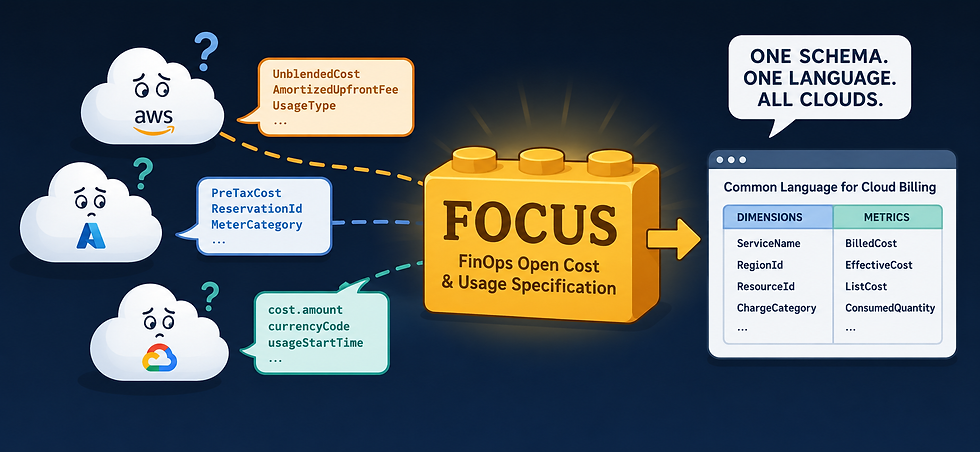
This also explains why FinOps tooling and cost platforms struggle to normalize subscription types. The data simply is not consistently available in public APIs.
The Bigger Lesson
Offer IDs made perfect sense in a world where Azure had a single commerce model. That world no longer exists. Today’s Azure commerce stack is layered, historical, and transitional. The seams show when you automate against it. The Azure portal hides those seams by using internal systems that you cannot access programmatically.
Once you accept that reality, you stop fighting the platform and start building automation that can survive it.
And if you have ever felt like you were losing your mind trying to reconcile what the portal shows with what the APIs return, you are not wrong. The platform really is fragmented here.


Comments